Research-based buying guide
PETLIBRO Granary PLAF103 5L Wi-Fi Feeder: Model Guide
Before you buy
What matters in daily use.
Useful when a cat wakes you before breakfast or dinner timing slips on a long commute.
Scheduling is the easy part; food shape, chute care, backup power, and pet behavior determine whether the routine stays reliable.
Exact-model owner evidence is limited. Saved schedules, food arriving, and the intended pet eating are separate checks.
What works well
- App scheduling supports predictable dry-food routines.
- Manufacturer specifies a 5L hopper for the linked model.
- Stainless steel bowl supports easier daily hygiene.
- Manufacturer documents stored schedules and emergency battery backup.
What to check first
- Manufacturer specifies dry kibble measuring 2–15mm; individual foods are untested by PawPilot.
- Three alkaline D backup batteries are sold separately; Wi-Fi is unavailable on battery power.
- Cleaning includes removable food-contact parts and the outlet, not only the bowl.
- An open serving bowl does not control which pet eats.
Buying checks
What the evidence supports
Exact-model research update: PETLIBRO Granary PLAF103
Model specifications checked October 12, 2026; predeparture checklist and outage-source update added October 24, 2026. Manufacturer-document research; PawPilot has not hands-on tested this feeder. The owner evidence we reviewed is too limited to claim a consensus or calculate reliability.
Already own a PLAF103? Use the feeding and power checklist or the model-specific outlet guidance below before considering a replacement. Still choosing? Start with our buying interpretation, then compare alternatives if a requirement does not fit.
The linked model is 5L
Our Amazon link identifies ASIN B09S8WMJY9 as PLAF103. PETLIBRO’s US specifications describe that Wi-Fi model as 5L. This corrects the earlier capacity description on this page. Granary camera versions and other Granary generations need their own model checks. Manufacturer model specifications.
As an Amazon Associate I earn from qualifying purchases. Check the selected model, seller, current price, and return terms before ordering.
Five things the documents clarify
- Food fit: PETLIBRO specifies dry kibble measuring 2–15mm. We have not tested particular foods or dispensing accuracy. PLAF103 food guidance.
- Offline feeding: the Granary FAQ describes saved feeding continuing when the unit is offline but powered, with app access unavailable. This is documented intended behavior, not our verification under every outage condition; see the checklist below. Granary support.
- Power backup: three alkaline D batteries, sold separately, provide emergency backup. The manufacturer says Wi-Fi is disabled on battery power while schedules continue. It advises against rechargeable batteries. We have not measured runtime. Model-specific backup guidance.
- Cleaning: the removable lid, hopper, tank base, bowl, and tray can be rinsed and must dry completely. The powered feeder base must not be rinsed or wiped with a wet cloth. Disconnect all power before maintenance and follow the supplied manual. Cleaning instructions, PLAF103 manual.
- Blocked-outlet alerts: current support guidance says firmware V1.0.58 or higher can continue dispensing even while a blockage notification appears. It recommends cleaning the outlet/detector and checking actual dispensing. This is intended-operation guidance, not proof of a jam-free product. Official alert explanation.
Predeparture feeding checklist
Check the meal, not just the connection icon. The steps below are PawPilot’s planning checklist for a PLAF103 household, not a stress test or a promise that a feeder can replace a caregiver. Complete them while someone is home and can feed the pet normally if anything is uncertain.
- Match the unit and food. Confirm PLAF103 on the device label and use the food already working in your routine. Check the hopper, outlet, and bowl for low food or obstruction. Do not introduce a new kibble, feeding schedule, or device setup immediately before leaving.
- Write down the next meals. Keep an offline note of the intended local meal times and portions, plus the last meal someone actually observed. While connected, check that the saved schedule agrees with that note. After any earlier power interruption, unexpected delay, or schedule change, observe a normal scheduled meal before relying on the setup again. Do not deliberately disconnect or restart the feeder as a last-minute test.
- Check power without interrupting it. Confirm the normal adapter connection is secure. PLAF103 guidance specifies alkaline D batteries for emergency backup, not primary power, and disables Wi-Fi on battery power. Follow the supplied manual to inspect or replace batteries well before departure. We have not measured backup runtime, so do not calculate a safe absence from battery size. PLAF103 power guidance.
- Watch a scheduled meal reach the bowl. A manual dispense command alone does not check the next scheduled meal. Observe the normal feeding time, food delivery, and which pet eats. If a meal is late or the app record disagrees with what you see, resolve the uncertainty with a person present rather than sending repeated extra meals remotely.
- Check the right kind of outage. A home internet failure, loss of feeder power, and a provider cloud incident are different problems. Bookmark the official PETLIBRO service status, but do not treat an Operational label as proof that your particular feeder is powered, correctly scheduled, or dispensing.
- Name the human backup. Leave a reachable caregiver the meal note, food location, and a way to check the bowl and pet directly. Agree who checks and when, and how they should report a missed or uncertain meal. If nobody can verify feeding when remote access fails, the departure plan is not ready.
If the app goes offline while you are away
Use the caregiver plan first to establish what actually happened at the bowl. Note the last observed meal and whether the home has power and internet. Avoid a remote reset, unbinding, or repeated power-cycling as a guess: those actions can complicate recovery. Follow model-specific support advice only with someone able to inspect the feeder and cover meals. A camera, if you already use one, is an observation aid, not a substitute for that person.
What the August outage does and does not tell us
PETLIBRO’s August 25, 2026 outage FAQ says offline results varied by model and device state: local clock limits and power interruptions could affect timing, and resets or rebinding could clear local schedules. It also warns that an app record alone cannot establish dispensing. The FAQ does not identify PLAF103 as an affected model, so it cannot prove that this unit failed or quantify its clock drift.
When checked October 24, the status page displayed Operational and retained a resolved August 12 incident timeline. This is historical incident guidance, not a claim of a current outage. Its broad saved-schedule reassurance needs to be read alongside the later FAQ’s qualifications; neither replaces an exact-unit check.
A handoff note worth saving
- Device label: PLAF103; location: ______
- Next meal times in local time and planned portions: ______
- Last scheduled meal directly observed, and which pet ate: ______
- Food and normal feeding instructions for the caregiver: ______
- Primary caregiver, backup contact, and next check-in: ______
- If feeding is uncertain: contact ______ before changing settings or giving an extra meal.
For a broader buying decision, read our smart feeder app and offline checks. These checks separate service status, device operation, and actual feeding instead of assigning an unmeasured app reliability score.
PawPilot’s buying interpretation
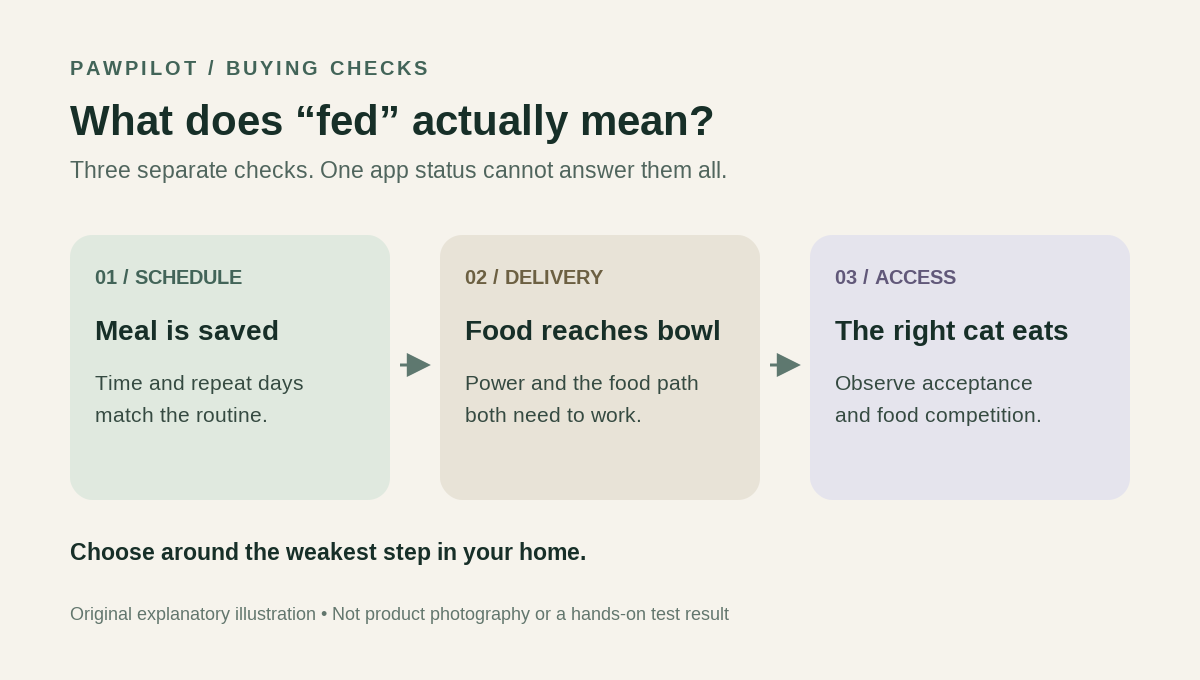
Treat a scheduled meal, food reaching the bowl, and the intended cat eating as three separate checks. Backup batteries may preserve feeding while remote visibility disappears. Two serving positions do not establish which cat gets the food.
That makes the PLAF103 a candidate for a straightforward dry-food schedule, subject to checking your own food, cleaning routine, and pet behavior. We would not choose an open-bowl timed feeder to enforce separate diets between cats that steal food. Keep a human care plan rather than relying on an app status alone.
Next step depends on the mismatch: for wet-food meals, read the Polar PLAF109 compatibility guide; for a required kibble outside the range, use the model-specific food check. An open bowl is not the choice for enforcing separate diets. If the food and care plan do fit, use the disclosed buying links to verify PLAF103, the selected variant, and seller terms rather than assuming every Granary listing matches.
If the PLAF103 does not fit, compare its documented limits with WOPET F07 Pro and PetSafe PFD00-16828 in our three-model automatic cat feeder comparison. That guide separates food fit, backup power, and cleaning needs rather than ranking unmeasured reliability.
We also checked publicly readable Chinese-language owner posts. The July 7 Dealmoon owner account and July 6 Dealmoon owner account concern camera-equipped Granary units supplied through the same trial campaign; they are incentivized accounts from one source group, and exact equivalence to this linked PLAF103 was not established. We therefore do not use those experiences to claim this model is reliable, quiet, jam-free, or suitable for every multi-cat home.
No star score or failure rate is assigned. The manufacturer’s own product page also gives different meal-count limits in its specifications and FAQ, so confirm the schedule limits for the exact unit before buying.
Shopping links, disclosed
Where to buy
Use these outbound links only after the fit still makes sense for your pet. Prices and stock can change.
As an Amazon Associate I earn from qualifying purchases. Affiliate revenue supports this site, but a product can still be rejected when reliability, safety, or owner-fit signals are weak.